
Essential EHR features for an occupational therapy practice

The right Electronic Health Record (EHR) features can help occupational therapists manage many of the administrative and clinical tasks that occur throughout the course of care.
From scheduling and documentation to billing, teletherapy, and progress tracking, the right EHR can bring multiple parts of an occupational therapy practice into one system. Understanding which EHR features support these workflows can help occupational therapists determine what they actually need from their practice management software.
Key takeaways
- Look for OT-specific workflows, not just a long feature list. Customizable documentation, goal tracking, assessments, and progress monitoring should support how occupational therapists actually deliver and document care.
- Integrated features can reduce repetitive admin work. Recurring scheduling, automated reminders, digital intake, documentation templates, and integrated billing can minimize duplicate data entry and manual tasks.
- Consider both clinical and practice-management needs. Scheduling, billing, teletherapy, client communication, reporting, and HIPAA-related security can be just as important as documentation.
- Choose an EHR that can grow with your practice. EHR features such as multiple provider calendars, permissions, centralized billing, reporting, and multidisciplinary support can become more important as a practice expands.
Streamline your practice with One EHR
- Scheduling
- Flexible notes
- Template library
- Billing & payments
- Insurance claims
- Client portal
- Telehealth
- E-fax

What is an occupational therapy EHR?
An OT EHR is a digital system for managing clinical records and practice operations. Depending on the platform, an EHR may include documentation, scheduling, billing, telehealth, client communication, intake forms, and reporting. OTs often document functional performance, track individualized goals over time, complete detailed evaluations and progress notes, and manage recurring appointments.
Essential EHR features for occupational therapy practices
EHR feature | How the feature supports an OT practice |
|---|---|
Scheduling and reminders | Manages recurring appointments, cancellations, rescheduling, reminders, and time zones |
Customizable documentation | Supports OT-specific evaluations, treatment notes, progress notes, and different populations |
Goal and progress tracking | Connects evaluations, treatment plans, goals, and progress over time |
Billing, invoicing and payments | Supports invoices, payment collection, outstanding balances, receipts, and other non-insurance billing workflows |
Insurance billing and claims | Supports eligibility verification, claims submission and tracking, and rejected or denied claims |
Integrated teletherapy | Keeps virtual visits, scheduling, interactive tools, and documentation connected |
Client portal and digital intake | Allows clients or caregivers to complete forms, sign documents, upload information, and communicate securely |
Assessments and outcomes | Helps clinicians record assessment results, outcome measures, and performance across sessions |
Reporting and analytics | Provides visibility into revenue, payments, claims, caseloads, visits, cancellations, and documentation |
Security and HIPAA support | Provides safeguards such as role-based access, encryption, secure authentication, and audit logs |
Scheduling and automated reminders: OT clients may attend therapy weekly or even multiple times per week. Recurring scheduling allows staff to create an ongoing appointment series rather than entering each visit individually.
Easy cancellation and rescheduling tools can also help practices keep clinicians' schedules accurate when families need to make changes. Automated reminders can reduce the amount of time spent manually contacting clients about upcoming visits.
For practices providing teletherapy, displaying the client’s time zone can help avoid confusion when the therapist and client are in different locations.
Documentation: OT documentation varies by population and setting. A pediatric OT may need evaluation sections addressing fine motor skills, sensory processing, self-care, play, and participation, while an OT working with adults may focus on ADLs, upper-extremity function, cognition, or home safety.
Customizable templates allow therapists to create documentation that reflects their actual practice. AI-assisted documentation may also help reduce repetitive administrative work.
Evaluation, progress notes, and goal tracking: Evaluation findings, treatment plans, goals, and progress notes are closely connected in occupational therapy. An EHR should make it easy to move information through each stage of the client’s care.
Billing, invoicing, and payments: For cash-pay and other non-insurance services, billing tools can help practices create invoices, collect and record payments, manage outstanding balances, and provide receipts or statements. Integrated payment processing can also reduce the need to manage financial information in a separate system.
Billing and claims management: For insurance-based OT practices, integrated billing tools can reduce the need to move information between separate clinical and billing systems. Eligibility verification can help practices confirm coverage before services, while claim tracking allows staff to identify claims that are pending, rejected, or denied.
Integrated teletherapy: Integrated teletherapy can simplify virtual OT services by keeping the appointment, video visit, and documentation within the same system. It can also provide secure video sessions, screen sharing, and interactive tools within the EHR.
Client portal and digital intake: Let clients or caregivers complete forms, sign documents, upload information, and send secure messages online. Digital intake allows therapists to review information before appointments. Electronic signatures can simplify consent forms and other required documentation.
Outcome and assessment tools: Progress monitoring or tracking helps occupational therapists determine whether intervention is supporting meaningful functional change. Depending on the EHR, clinicians may be able to record assessment results, outcome measures, goal data, or performance across sessions.
Report and practice analytics: Reporting features such as tracking revenue, payments, outstanding balances, claims, caseloads, visits, cancellations, and documentation status allow practice owners to look beyond an individual client’s record and better understand how the practice is functioning overall.
Security and HIPAA compliance: As EHRs contain protected health information, practices need appropriate safeguards for accessing and storing client information. Look for role-based access, encryption, secure authentication, and audit logs. Practices should also maintain appropriate policies, staff training, and access controls to support HIPAA compliance.
Practice Management + EHR + Telehealth
Manage more in less time in your practice with TheraPlatform
Features solo OTs vs. group practices may need
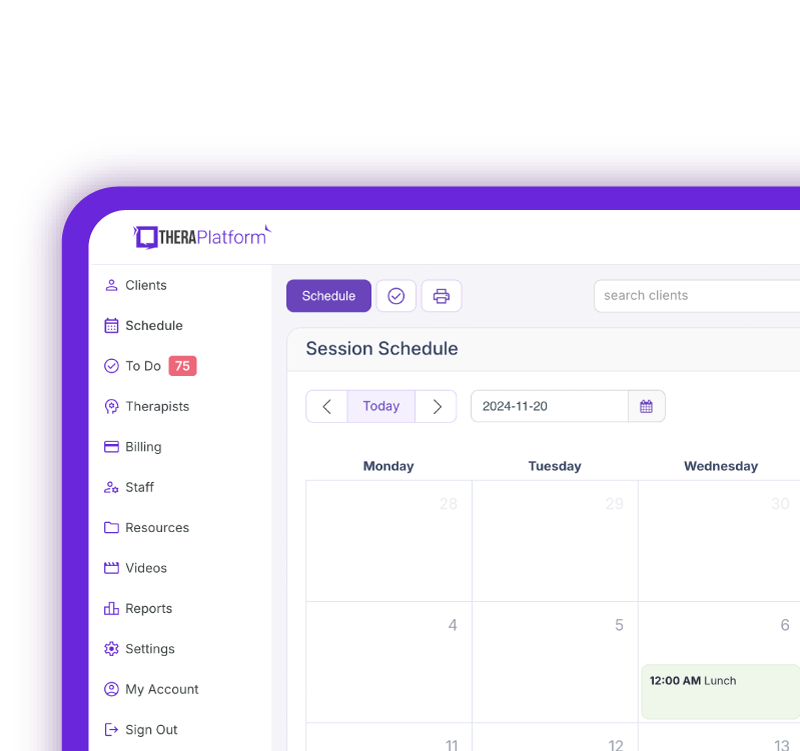
A solo occupational therapist may prioritize simplicity. Scheduling, documentation, billing, teletherapy, digital intake, and payment management within one platform may be enough for managing a smaller caseload. Group practices often require additional functionality, such as multiple provider calendars, different permission levels, clinician productivity reports, centralized billing, and administrative oversight.
Multidisciplinary practices may also benefit from systems that support several therapy disciplines while allowing each provider to maintain discipline-specific documentation and workflows.
Which EHR features can save OTs the most time?
The biggest time-saving opportunities often come from reducing repetitive administrative tasks.
- Recurring scheduling eliminates repeated calendar entries
- Automated reminders reduce manual appointment communication
- Digital intake eliminates re-entering information from paper forms
- Documentation templates reduce repetitive typing
- Integrated billing can decrease duplicate data entry between clinical and financial systems
Questions to ask during an EHR demo
When exploring EHR features, consider how each capability would fit into your practice’s everyday workflow. Some questions may include the following:
- Can evaluation and treatment note templates be customized for occupational therapy?
- Can goals carry forward into treatment notes and progress notes?
- Does the system support scheduling recurring appointments and easy scheduling?
- Can clients or caregivers complete and electronically sign intake forms?
- How does the system handle eligibility verification, claims, ERAs/EOBs, and denials?
- Does teletherapy integrate with scheduling and documentation?
- Can the system support multiple clinicians or disciplines if the practice grows?
- What security features are available to protect client information?
The goal is not to find an EHR with the longest feature list, but to consider whether those features support the clinical and administrative tasks they perform regularly.
Free Resources for Therapists
Click below and help yourself to peer-created resources:

Choosing an EHR that can grow with your practice
An occupational therapy EHR should support both clinical care and the administrative work required to deliver it. For many occupational therapy practices, the most useful systems bring documentation, scheduling, billing, teletherapy, client communication, and progress tracking together rather than requiring therapists to manage multiple disconnected tools. Practice needs can also change over time.
A solo OT may eventually hire another clinician, begin accepting insurance, add teletherapy, or expand into a multidisciplinary practice.
Choosing an EHR with flexible documentation, integrated workflows, and room to support additional providers and services can help the technology continue to meet the practice’s needs as it grows.
Streamline your practice with One EHR
- Scheduling
- Flexible notes
- Template library
- Billing & payments
- Insurance claims
- Client portal
- Telehealth
- E-fax
Resources for occupational therapists
TheraPlatform is an all-in-one EHR, practice management, and teletherapy software built with AI-powered notes for therapists to help them save time on admin tasks. It offers a 30-day risk-free trial with no credit card required and supports different industries and sizes of practices, including occupational therapists in group and solo practices.
More resources
- Therapy resources and worksheets
- Therapy private practice courses
- Ultimate teletherapy ebook
- The Ultimate Insurance Billing Guide for Therapists
- The Ultimate Guide to Starting a Private Therapy Practice
- Insurance billing 101
- Practice management tools
Free video classes
- Free on-demand insurance billing for therapist course
- Free mini video lessons to enhance your private practice
- 9 Admin tasks to automate in your private practice
References
- Electronic Data Interchange (EDI) Support | CMS. www.Cms.Gov. Retrieved September 1, 2026, from https://www.cms.gov/medicare/coding-billing/electronic-billing/electronic-data-interchange-support
- Guidelines for Documentation of Occupational Therapy. American Journal of Occupational Therapy. 2018;72(2_suppl):S362-S368. doi: 10.5014/ajot.2018.72S203
FAQs about essential EHR features for occupational therapists
What features should an occupational therapy EHR have?
An OT EHR may include customizable documentation, scheduling, billing, goal tracking, digital intake, teletherapy, reporting, and security features.
How can an EHR save occupational therapists time?
Features such as recurring scheduling, automated reminders, digital intake, documentation templates, and integrated billing can reduce repetitive administrative work.
Do solo OTs and group practices need the same EHR features?
Not necessarily. Solo OTs may prioritize simplicity, while group practices may need multiple calendars, permission levels, centralized billing, productivity reporting, and multidisciplinary support.