How an EHR can reduce documentation time for SLPs

Speech-language pathologists (SLPs) spend considerable time documenting evaluations, treatment sessions, progress, and clinical outcomes. Re-entering client information, reviewing previous notes, tracking goals, and managing documentation across different systems can add unnecessary administrative work.
According to ASHA's 2024 Schools Survey, full-time school-based SLPs providing clinical services reported spending an average of six hours per week on documentation. Although this finding is specific to school settings, it highlights the time documentation can require alongside direct client care.
An Electronic Health Record (EHR) can help reduce repetitive documentation tasks through automation, connected workflows, and AI-assisted tools. This guide explores where SLPs commonly lose time and how EHR features can simplify documentation without compromising accuracy or individualized care.
Key takeaways
- SLPs can spend significant time on documentation; ASHA’s 2024 Schools Survey found clinical service providers reported an average of six hours per week on documentation.
- SLP EHR features such as reusable templates, auto-population, carry-forward functionality, and integrated treatment goals can reduce repetitive documentation tasks.
- Integrated workflows can connect documentation with scheduling, billing, intake, assessments, and teletherapy, reducing duplicate data entry and manual handoffs.
- AI-assisted documentation can help create draft notes and support dictation, but SLPs remain responsible for reviewing documentation for clinical accuracy and completeness.
Streamline your practice with One EHR
- Scheduling
- Flexible notes
- Template library
- Billing & payments
- Insurance claims
- Client portal
- Telehealth
- E-fax

Why does speech therapy documentation take so much time?
Speech-language pathologists (SLPs) often spend time on administrative tasks that extend beyond documenting clinical findings. Reviewing intake information, entering repetitive details, tracking treatment goals, and managing records across systems can add to the documentation workload.
Repetitive data entry
SLPs may need to enter the same client demographics, diagnoses, treatment goals, and other information across evaluations, daily treatment notes, progress reports, and discharge summaries.
Repeatedly copying or re-entering this information takes time and can introduce inconsistencies between records.
Reviewing and organizing intake information
Before documenting evaluation findings, SLPs often review intake forms, case histories, medical information, and caregiver concerns.
Identifying clinically relevant details and organizing them into the appropriate assessment sections can be time-consuming, especially when intake forms and evaluation templates are separate.
Switching between systems
When practices use separate platforms for scheduling, documentation, assessments, billing, and teletherapy, SLPs may need to navigate multiple systems, locate client information, and manually transfer details between them.
This can interrupt documentation workflows and create additional administrative tasks.
Tracking goals and progress manually
Monitoring treatment progress can require SLPs to review previous session notes, locate performance data, compare accuracy percentages or cueing levels, and manually summarize progress toward individual goals.
When treatment goals and session data are stored separately, preparing progress reports can require additional time.
Completing notes after sessions
Back-to-back appointments may leave SLPs with limited time to complete documentation during the workday. As a result, treatment notes may be completed hours later, requiring SLPs to recall session details or review handwritten notes and other records.
Timely documentation is important for maintaining accurate clinical records. As the American Speech-Language-Hearing Association (ASHA) emphasizes, documentation communicates essential information about patient diagnoses, treatment, and outcomes.
Practice Management + EHR + Telehealth
Manage more in less time in your practice with TheraPlatform
How an EHR can help SLPs save time on documentation
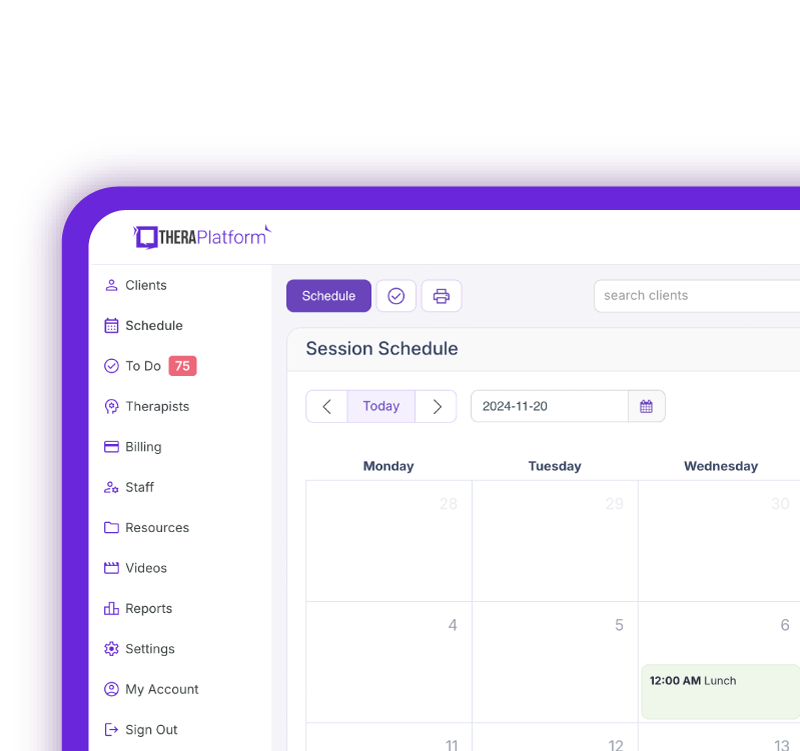
An EHR can reduce repetitive documentation tasks by keeping clinical information connected and making it easier for SLPs to access, reuse, and update relevant information throughout care.
Here are several ways EHR features can streamline documentation workflows:
- Start with reusable note templates: Prebuilt templates for speech-language evaluations, daily treatment notes, progress reports, and discharge summaries reduce the need to create each document from scratch. Customizable fields allow SLPs to adapt templates to their practice without repeatedly rebuilding forms.
- Automatically populate client information: Demographics, diagnoses, provider details, and other information already stored in the EHR can populate appropriate note fields, reducing manual entry and helping maintain consistency across records.
- Carry relevant information forward: SLPs can reuse treatment goals, clinical history, and other appropriate details from previous records rather than entering them again. Carried-forward information should always be reviewed and updated to accurately reflect the current encounter.
- Keep treatment goals and session data connected: When goals are accessible within treatment notes, SLPs can record accuracy percentages, cueing levels, and other performance data without searching through previous documentation. This also makes it easier to review progress when completing reports.
- Keep clinical records in one place: Having evaluations, treatment plans, session notes, and progress reports within the same EHR reduces the need to switch between applications or search for information stored in separate systems.
- Streamline intake-to-assessment documentation: When intake forms are connected to evaluation workflows, relevant history and client information can be transferred into assessment templates. AI-assisted features may also help organize that information into appropriate sections, reducing manual review and re-entry while allowing SLPs to verify the content.
Watch this video to learn how to save time on therapy notes
How EHR features address common SLP documentation challenges
An EHR can help reduce time spent on repetitive documentation tasks by connecting client information, treatment goals, and clinical records. The table below highlights common documentation challenges and the features that can help address them.
Documentation challenge | EHR feature that can help | Potential time-saving benefit |
|---|---|---|
Re-entering client information | Automatic population of client details | Reduces repeated entry of demographics, diagnoses, dates, and provider information |
Creating notes from scratch | Reusable SLP documentation templates | Provides a starting point for evaluations, treatment notes, progress reports, and discharge summaries |
Re-entering information from previous notes | Carry-forward functionality | Allows SLPs to reuse and update relevant information instead of entering it again |
Reviewing and organizing intake information | Connected intake forms and AI-assisted assessment documentation | Helps transfer relevant intake information into evaluation templates, reducing manual review and re-entry |
Tracking treatment goals manually | Integrated goals and session data | Makes it easier to record performance and review progress without searching through previous notes |
Switching between separate systems | Integrated clinical and practice management workflows | Keeps documentation, scheduling, assessments, and billing information accessible within one platform |
Writing lengthy treatment notes manually | AI-assisted note drafting and dictation | Helps SLPs create draft documentation for review and editing, reducing manual writing and typing |
How AI can help SLPs save time on documentation
AI-assisted tools can reduce the time SLPs spend drafting notes, organizing assessment information, and entering clinical details. Depending on the EHR, these capabilities may include:
- AI-generated note drafts: AI can help turn session information into structured documentation, such as a SOAP note. Rather than starting with a blank note, SLPs can review, edit, and finalize a draft.
- Dictation and speech-to-text: SLPs can dictate observations, interventions, and clinical reasoning instead of typing everything manually, making it easier to document information between sessions.
- Ambient documentation: With appropriate consent and safeguards, some AI tools can capture session audio and generate draft notes for review, reducing the need to reconstruct session details afterward.
- AI-assisted assessments: AI can help organize intake information within evaluation templates, reducing the time spent reviewing and transferring details manually. For example, TheraPlatform's AI Assessment feature can populate assessment templates with relevant information collected during intake, allowing SLPs to review and complete the documentation with their own clinical findings.
SLP review is essential. AI-generated documentation should always be checked for accuracy, completeness, and consistency with the services provided before signing or finalizing a note. AI can assist with documentation, but it does not replace professional clinical judgment.
AI-assisted assessments
During assessments, AI can potentially assist with organizing clinical findings and synthesizing raw data into a structured evaluation summary draft.
Clinician review and finalization
AI-generated documentation should also be reviewed by the SLP to ensure it accurately reflects the services provided. Clinical judgment should not be replaced with AI.
Free Resources for Therapists
Click below and help yourself to peer-created resources:

How integrated EHR workflows save SLPs time beyond writing notes
Saving documentation time isn't just about completing notes faster. When scheduling, clinical records, billing, and teletherapy are connected, SLPs can spend less time switching between systems and manually transferring information.
Scheduling and documentation
An integrated EHR can allow SLPs to open a treatment note directly from a scheduled appointment, with relevant details such as the client, date of service, and appointment information already available. This reduces the need to create records separately or repeatedly enter session details.
Documentation and billing
When documentation and billing are connected, appointment details, service codes, and other relevant information can carry into billing workflows. This reduces duplicate entry and helps practices prepare invoices or insurance claims without manually transferring information between separate systems.
Client intake and evaluations
Digital intake forms connected to evaluation templates can reduce the need to manually transfer client history and other relevant information. SLPs can review and verify the information within the assessment rather than repeatedly entering it.
Teletherapy and session notes
An EHR with integrated teletherapy and documentation can allow SLPs to access client records and complete treatment notes during or after virtual sessions without switching between unrelated applications.
How to test whether an EHR will save you time on documentation
An EHR may offer templates, automation, and AI tools, but the real question is how much time these features save in everyday practice. A demo can introduce the capabilities, while a free trial allows SLPs to test the complete documentation workflow using realistic examples.
During a free trial, try these tasks:
- Complete a sample treatment note: Document treatment goals, skilled interventions, accuracy percentages, cueing levels, and client responses. Pay attention to how many steps are required and whether the workflow feels intuitive.
- Check for repetitive data entry: See whether client details, diagnoses, and treatment goals automatically appear in appropriate fields or require manual entry across multiple documents.
- Test carry-forward functionality: Create a follow-up note and evaluate how easily relevant information from a previous session can be reused, updated, or removed.
- Generate a progress report: Check whether treatment goals and previously recorded performance data are readily accessible without searching through individual session notes.
- Customize a documentation template: Modify fields, dropdown menus, or sections to match your SLP specialty and determine whether changes can be saved for future use.
- Try AI-assisted documentation: Test available AI documentation tools, including note drafting and assessment workflows. Evaluate how much editing is required and whether the tools actually reduce documentation time.
As you test, consider not only how quickly you can create a note, but also how much time you spend reviewing, correcting, and finalizing it. AI-generated content should be checked for accuracy, and practices should understand how sensitive client information is protected.
The goal is to find an EHR that reduces the total time spent completing accurate clinical documentation, not simply one that generates notes quickly.
Spend less time documenting and more time with clients
Clinical documentation is an essential part of speech therapy, but repetitive data entry, disconnected systems, and manual workflows can take valuable time away from client care.
The right EHR can help SLPs work more efficiently by connecting clinical records, automating routine tasks, simplifying progress tracking, and using AI-assisted tools to reduce documentation time without sacrificing accuracy or individualized care.
TheraPlatform brings customizable documentation templates, integrated treatment goals, AI-assisted documentation, scheduling, billing, and teletherapy together in one platform designed to streamline speech therapy practice management.
See how much time you could save with TheraPlatform's 30-day free trial.
Streamline your practice with One EHR
- Scheduling
- Flexible notes
- Template library
- Billing & payments
- Insurance claims
- Client portal
- Telehealth
- E-fax
Resources for speech therapists
TheraPlatform is an all-in-one EHR, practice management, and teletherapy software with AI-powered notes built for therapists to help them save time on admin tasks. It offers a 30-day risk-free trial with no credit card required and supports different industries and sizes of practices, including speech-language pathologists in group and solo practices.
More resources
- Therapy resources and worksheets
- Therapy private practice courses
- Ultimate teletherapy ebook
- The Ultimate Insurance Billing Guide for Therapists
- The Ultimate Guide to Starting a Private Therapy Practice
- Insurance billing 101
- Practice management tools
Free video classes
- Free on-demand insurance billing for therapist course
- Free mini video lessons to enhance your private practice
- 9 Admin tasks to automate in your private practice
References
Ayer, M. (2023). Relieving administrative burden on clinical staff with streamlined workflows and speech-recognition software. British Journal of Nursing, 32(Sup16b), S1-S9. DOI: https://www.magonlinelibrary.com/doi/abs/10.12968/bjon.2023.32.Sup16b.S4?journalCode=bjon
Kanaparthy, N. S., Villuendas-Rey, Y., Bakare, T., Diao, Z., Iscoe, M., Loza, A., ... & Taylor, R. A. (2025). Real-world evidence synthesis of digital scribes using ambient listening and generative artificial intelligence for clinician documentation workflows: rapid review. JMIR AI, 4, e76743. DOI: https://ai.jmir.org/2025/1/e76743
Li, Y. H., Li, Y. L., Wei, M. Y., & Li, G. Y. (2024). Innovation and challenges of artificial intelligence technology in personalized healthcare. Scientific reports, 14(1), 18994. https://www.nature.com/articles/s41598-024-70073-7
FAQs about how an EHR can help speech therapists save time on documentation
How can an EHR reduce speech therapy documentation time?
An EHR can reduce repetitive tasks through SLP templates, auto-population, carry-forward features, integrated goals, and connected workflows.
Can AI help SLPs complete documentation faster?
AI can assist with draft notes, dictation, ambient documentation, and evaluation summaries, but SLPs should review AI-generated documentation for accuracy.
What should SLPs look for when evaluating an EHR for documentation?
Test a real speech therapy note, look for duplicate data entry, evaluate template and goal customization, and test AI tools during the demo.