Questions to ask during an occupational therapy EHR demo: A checklist for therapy practices

An occupational therapy electronic health record (EHR) demo is an opportunity to see how a system could actually function within your therapy practice. While feature lists and pricing pages can help you narrow down your options, a live demo can reveal how well the software fits your day-to-day clinical and administrative workflows.
Whether you are a solo occupational therapist or part of a multi-disciplinary practice, going to an EHR demo with a plan can make it easier to compare platforms. Rather than simply watching vendors walk through their preferred features, use the demo to ask specific questions and test common tasks.
→ Download My Free EHR (+practice management software) Buyer’s Guide for Therapists
Key takeaways
- Prepare for the demo with your practice needs in mind. Identify current challenges and must-have features before meeting with an EHR vendor.
- Test real occupational therapy workflows. Ask the vendor to demonstrate tasks such as scheduling a recurring client, creating an OT treatment note, submitting a claim, collecting a payment, and running a report.
- Evaluate the entire practice workflow. Consider documentation, goal tracking, scheduling, the client portal, billing, telehealth, reporting, security, and implementation, not just individual features.
- Understand the total cost. Ask which features are included in the subscription and which require additional fees, including billing, telehealth, AI tools, training, data migration, and additional users.
Streamline your practice with One EHR
- Scheduling
- Flexible notes
- Template library
- Billing & payments
- Insurance claims
- Client portal
- Telehealth
- E-fax

How to prepare for an occupational therapy EHR demo
Before attending the demo, identify the problems you are hoping a new occupational therapy EHR will solve:
- Are you spending too much time on documenting?
- Is scheduling difficult to manage?
- Are claims frequently delayed?
- Are administrative tasks spread across multiple systems?
After you’ve identified some problems, bring in a few real-world scenarios from your occupational therapy practice.
Consider how you currently schedule recurring appointments, complete an evaluation, update goals, collect copays, or submit a claim.
It is important to ask vendors to demonstrate these workflows, so you can determine how many steps are actually involved. In addition, create a list of must-have features.
Occupational therapy EHR demo testing checklist
During an occupational therapy EHR or EMR demo, ask vendors to demonstrate realistic clinical and administrative workflows rather than simply describing their features. Use this checklist to evaluate how easily each system handles everyday OT tasks and identify potential limitations before purchasing.
EHR area | What OTs should look for | What to test during the demo |
|---|---|---|
Clinical documentation | Customizable OT evaluations, treatment notes, progress reports, discharge summaries, electronic signatures, and goal integration. | Create a sample OT evaluation and treatment note. Check whether assessment findings, goals, and client information carry forward without duplicate entry. |
Assessments and outcome measures | Support for standardized assessments, functional outcome measures, scoring, and progress tracking. | Document a functional assessment, enter scores from a measure such as the QuickDASH or COPM, and check how results appear in reports. |
Functional goal tracking | Individualized ADL/IADL goals, measurable performance data, assistance levels, and progress monitoring. | Create a dressing or self-care goal, document the client's level of assistance, and track progress across multiple sessions. |
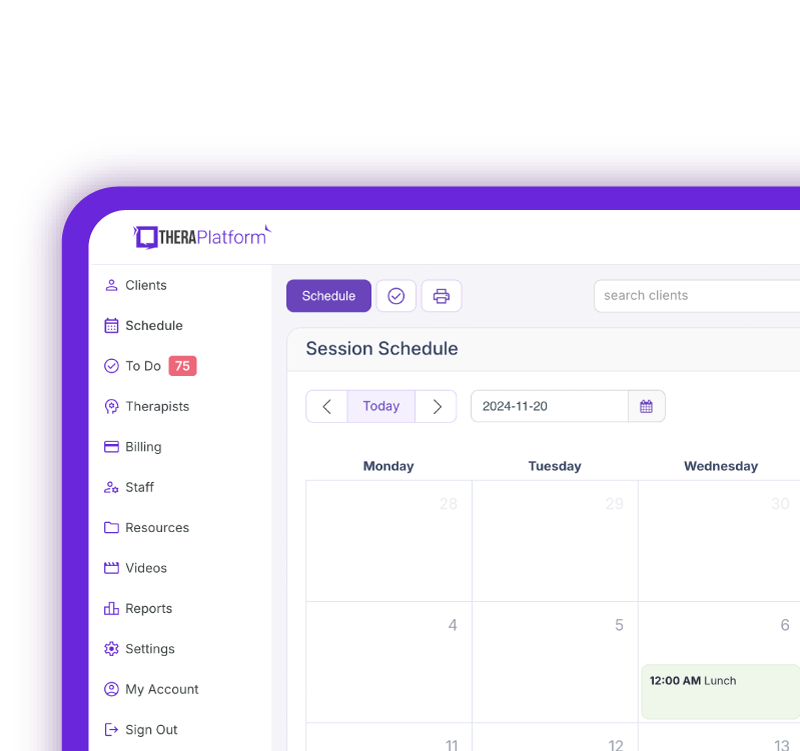
Scheduling | Recurring appointments, automated reminders, clinician availability, rescheduling, multiple locations, and time zone support. | Schedule recurring OT sessions, reschedule an appointment, test reminders, and check for scheduling conflicts. |
Billing and payments | Invoicing, credit card processing, payment tracking, outstanding balances, and financial reporting. | Complete an appointment, generate an invoice, record a payment, and check how outstanding balances are tracked. |
Insurance and authorizations | Electronic claims, CPT codes, timed treatment units, eligibility verification, authorization tracking, and ERA posting. | Create a test claim using timed OT treatment units, review authorization usage, and check how claim rejections and payments are tracked. |
Telehealth | Client access, device compatibility, screen sharing, interactive tools, and scheduling integration. | Join a mock OT telehealth session, share a home exercise or activity resource, test interactive tools, and check calendar integration. |
Client portal and intake | Online intake, consent forms, caregiver access, document sharing, messaging, and electronic signatures. | Complete an intake form as a client or caregiver, sign consent documents, and verify that submitted information appears in the client record. |
Reporting | Revenue, appointments, cancellations, clinician productivity, outstanding claims, customizable filters, and exports. | Generate a report showing completed appointments, unpaid claims, or clinician productivity. Check whether it can be filtered and exported. |
AI documentation (if offered) | AI note drafting, dictation, transcription, clinician editing, and documentation review. | Generate a sample OT treatment note, check clinical accuracy, correct any errors, and review the approval process before signing. |
After the demo: Rate each area as Meets Requirements, Partially Meets Requirements, or Does Not Meet Requirements. Record any limitations, additional costs, or manual workarounds so you can compare vendors consistently.
Questions to ask about occupational therapy clinical workflows
During an occupational therapy EHR or EMR demo, ask vendors to demonstrate how their software supports OT evaluations, functional goals, treatment documentation, and progress tracking. Use scenarios relevant to your practice, whether you serve pediatric, adult, neurological, or orthopedic populations.
OT documentation and templates
- Can you demonstrate creating an OT evaluation and treatment note using the available templates?
- Can we customize templates for different OT specialties, such as pediatrics, hand therapy, and neurological rehabilitation?
- Can clinicians document ADLs/IADLs, functional performance, objective findings, and skilled interventions within the same workflow?
- Can evaluation findings and treatment goals carry forward into subsequent notes without duplicate entry?
- Can you show how caregiver education, home programs, adaptive equipment, and splinting or orthotic interventions are documented?
- How does the system handle required fields, electronic signatures, co-signatures, and incomplete documentation?
Practice Management + EHR + Telehealth
Manage more in less time in your practice with TheraPlatform
OT assessments and outcome measures
- Can you demonstrate how an OT records standardized and non-standardized assessment findings?
- Can clinicians enter scores and track changes in functional performance over time?
- Does the platform support outcome measures commonly used in our practice, such as the QuickDASH, Canadian Occupational Performance Measure (COPM), or pediatric assessments?
- Can you demonstrate whether supported assessments are automatically scored or require manual entry?
- How are assessment results incorporated into progress reports and discharge documentation?
Treatment plans and functional goal tracking
- Can you demonstrate creating and updating individualized, occupation-based treatment goals?
- Can clinicians track measurable outcomes such as ADL independence, assistance levels, task performance, and participation?
- Can you show how therapists document progress toward goals across multiple treatment sessions?
- How does goal progress carry forward into treatment notes, progress reports, and treatment plan updates?
- Can the system track treatment plan review dates, progress report deadlines, and re-evaluation requirements?
AI documentation
If the EHR offers AI-assisted documentation, ask:
- Can you demonstrate AI-assisted OT documentation using a realistic treatment scenario?
- Does AI support dictation, transcription, note drafting, or other documentation tasks?
- Can AI-generated notes incorporate OT-specific terminology, functional performance, interventions, and treatment goals?
- Can clinicians review, edit, and approve AI-generated documentation before signing?
- How can therapists identify and correct inaccurate, incomplete, or unsupported information?
- How are recordings, transcripts, and AI-generated content stored, protected, and retained? What consent procedures may be needed?
- Are AI documentation capabilities included in the subscription or available for an additional fee?
Questions OTs should ask about scheduling
- Can we schedule recurring appointments and easily modify individual visits within a series?
- Does the system send automated appointment reminders, and can those reminders be customized?
- Can therapists view and manage schedules across multiple clinicians, locations, or service types?
Questions OTs should ask about the client portal
- Can clients securely complete and submit intake forms, consent forms, and other paperwork through the portal?
- Can clients use the portal to view appointments, receive reminders, and access relevant documents?
- Can clients securely communicate with the practice, and can portal access be managed for parents, caregivers, or other authorized individuals?
Free Resources for Therapists
Click below and help yourself to peer-created resources:

Billing and insurance questions
If you bill insurance, ask the vendor to walk through the entire billing workflow rather than simply confirming that insurance billing is available.
- Can therapists or billers create claims directly from documentation?
- How are rejected or denied claims identified?
- Can staff track claim status within the system?
- Does the EHR support eligibility checks, authorizations, ERAs, and electronic claims?
Billing and invoicing
For private-pay practices, ask how credit cards, invoices, copays, and outstanding balances are handled.
It is also important to ask whether payment processing, claims, eligibility checks, or billing services involve additional transaction or subscription fees.
Questions OTs should ask about telehealth
If your practice provides teletherapy, consider these questions:
- Is telehealth built directly into the EHR or requires another platform?
- How do both the therapist and client access a teletherapy session?
- Do clients need to download an app or create a separate account?
- Is it secure?
- Are there any relevant features such as screen sharing, waiting rooms, multiple participants, and integration with scheduling and documentation?
Questions to ask about reporting and analytics
Reporting capabilities can become particularly important as practice grows.
Ask:
- Which OT reports can be customized?
- Are vendors able to generate an actual report during the demo so you can see how easy it is to find, filter, and export the information you need?
Questions OTs can ask about security and HIPAA compliance
Occupational therapy practice owners should understand how an EHR protects electronic protected health information (ePHI).
- Ask about HIPAA compliance, encryption, access controls, audit logs, backups, and user permissions.
- Understand whether different team members require different levels of access and ask whether permissions can be customized by role.
- Ask whether the vendor will enter into a Business Associated Agreement (BAA), and what security procedures are in place if an account or system is compromised.
Questions for OTs to ask about implementation
Implementation can have a significant impact on how smoothly your practice transitions to the new system.
Be sure to understand:
- Data migration: Ask what information can be transferred from your existing system. Can demographic information, clinical notes, documents, insurance information, and outstanding balance be migrated?
- Training: Ask what training is included during implementation. Is training live, recorded, self-guided, or a combination? Is additional training available for new employees later?
- Customer support: Ask how support is provided after implementation. Is assistance available by phone, email, live chat, or ticketing system? What are the support hours and typical response times?
Questions to ask about occupational therapy EHR pricing
A monthly subscription price does not always represent the total cost of an EHR. During the demo, ask for a clear explanation of what is included in the quoted price and what requires an additional fee.
Ask about:
- Telehealth, billing, claims, payment processing, AI features, reminders, and additional users
- Setup, implementation, training, or data migration fees
- Monthly versus annual contracts
- Cancellation requirements
- How pricing changes as clinicians, locations, or clients are added
What to test during the demo
Ask the vendor to complete realistic OT tasks that reflect your practice
Give the vendor realistic tasks, such as:
- Scheduling a recurring client
- Create an occupational therapy treatment note
- Submit or track a claim
- Collect payment for occupational therapy services
- Run an occupational therapy report
- Launching a teletherapy session
It is essential to watch how many steps each task requires and whether the workflow feels intuitive. A feature may technically exist, but still require multiple workarounds or unnecessary steps.
Occupational therapy EHR demo red flags
Pay attention to potential red flags during an EHR demo, including:
- Features that are repeatedly described as coming soon
- Unclear or complicated pricing
- Unexpected add-on fees for features
- Difficulty answering questions about data migration or security
- Workflows that require multiple manual steps or workarounds
- Limited options for customizing documentation or workflows
- Difficulty demonstrating common tasks within the system
- Unclear information about training or ongoing customer support
Overall, the most useful occupational therapy EHR demo should help you understand what using the software will look like on an ordinary occupational therapy workday.
Streamline your practice with One EHR
- Scheduling
- Flexible notes
- Template library
- Billing & payments
- Insurance claims
- Client portal
- Telehealth
- E-fax
Resources for occupational therapists
TheraPlatform is an all-in-one EHR, practice management, and teletherapy software built with AI-powered notes for therapists to help them save time on admin tasks. It offers a 30-day risk-free trial with no credit card required and supports different industries and sizes of practices, including occupational therapists in group and solo practices.
More resources
- Therapy resources and worksheets
- Therapy private practice courses
- Ultimate teletherapy ebook
- The Ultimate Insurance Billing Guide for Therapists
- The Ultimate Guide to Starting a Private Therapy Practice
- Insurance billing 101
- Practice management tools
Free video classes
- Free on-demand insurance billing for therapist course
- Free mini video lessons to enhance your private practice
- 9 Admin tasks to automate in your private practice
References
- Health IT Playbook. The Office of the National Coordinator (ONC) for Health Information Technology Health IT Playbook. https://playbook.healthit.gov/playbook/electronic-health-records/
- Yamkovenko, S. Q&A with Cathy Brennan, MA, OTR/L, FAOTA. American Occupational Therapy Association. https://www.aota.org/practice/practice-essentials/documentation/qa-with-cathy-brennan
FAQs About Occupational Therapy EHR Demos
What should OTs ask during an EHR demo?
Ask about documentation, goal tracking, scheduling, the client portal, billing, telehealth, security, implementation, support, and total pricing.
How should an OT prepare for an EHR demo?
Identify current workflow challenges, create a list of must-have features, and prepare realistic tasks for the vendor to demonstrate.
What are red flags during an occupational therapy EHR demo?
Watch for unclear pricing, unexpected add-on fees, limited customization, manual workarounds, difficulty demonstrating common tasks, and unclear information about security, training, or support.